Containers: Docker & Apptainer
Here we describe the container software available on the cluster, including Apptainer (formerly Singularity) and how to use Docker images via conversion.
What are containers?
Containers are a technology used to package and run software in a lightweight, portable, and consistent manner across different computing environments. They encapsulate an application along with all its dependencies, including libraries, tools, configuration files, and runtime into a single unit known as a container image.
When this image is run as a container, it behaves as if the software is being executed in its native environment, regardless of where the container is deployed. This means that containers allow developers and researchers to build once and run anywhere, whether on a personal laptop, a public or private cloud, a remote server, or a high-performance computing (HPC) cluster.
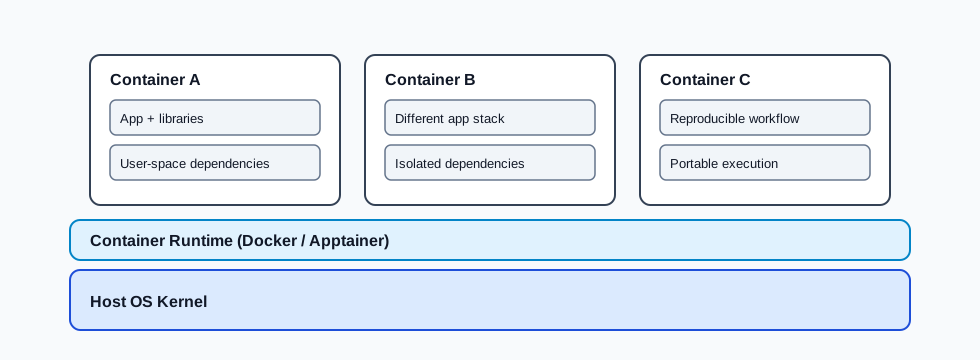
Containers package applications and dependencies while sharing the host operating system kernel.
Container Platforms
Container platforms like Docker and Apptainer (formerly known as Singularity) provide the tools and runtime environment to create, manage, and execute containers. While Docker is widely used in industry and development environments, Apptainer is designed specifically with scientific computing and HPC in mind, offering features like user-level execution (no root privileges required to run containers) and native integration with job schedulers.
Key Benefits of Using Containers
Portability: Because all dependencies are packaged within the container, the same container image can run identically on any system with a compatible container runtime. This reduces the traditional “it works on my machine” problem.
Reproducibility: Scientific workflows and analyses can be fully encapsulated in containers, ensuring that experiments can be repeated with the exact same software environment after many years.
Compatibility: Containers isolate the application from the underlying host system, avoiding conflicts with system-installed software or libraries.
Efficiency: Unlike virtual machines, containers share the host operating system kernel, making them more lightweight, faster to start, and less resource-intensive.
Version Control and Sharing: Container recipes can be versioned in code repositories, and built images can be shared through container registries such as Docker Hub, GitHub Container Registry, or Quay.io.
How to Run a Job in a Container on Slurm Cluster
Because of its security and HPC-friendly design, Apptainer is the only container platform supported on all University clusters, including CoSTAR.
To run a containerised job you must either:
Build a native Apptainer image (.sif), or
Convert an existing Docker image to Apptainer.
Apptainer is compatible with Docker images and can automatically convert them into .sif files.
Building Container Images
There are several options available for building container images, depending on your workflow and access:
Build the image locally using Docker or Apptainer, then transfer the resulting native or Docker-converted
.siffile to the cluster.Build the image directly on the cluster using an interactive session on one of the compute nodes.
Build the image using an external repository or registry service, such as GitHub Actions, GitLab CI/CD, Docker Hub automated builds, or another trusted CI service.
Note
Only native Apptainer images can be built directly on the cluster, Docker is not supported.
For advice on naming image versions, see Tagging container images.
1. Docker / Apptainer Local Build
Docker builds images from a Dockerfile a text file listing the commands needed to assemble an image.
Official reference: https://docs.docker.com/engine/reference/builder/
Build command reference: https://docs.docker.com/engine/reference/commandline/build/
Following is a simple Python-in-a-container example:
  # Small Python base image
  FROM python:3.12-slim

  # Set a working directory (optional but tidy)
  WORKDIR /app

  # Copy the script into the image
  COPY app.py .

  # Default command: run the script
  CMD ["python", "app.py"]
  import sys

  name = sys.argv[1] if len(sys.argv) > 1 else "world"
  print(f"Hello, {name}! This is Python running inside Docker.")
  # Build the image (from the folder containing Dockerfile and app.py)
  docker build -t hello-python .

  # Run it
  docker run --rm hello-python
  # Hello, world! This is Python running inside Docker.

  # Run it with a parameter
  docker run --rm hello-python container
  # Hello, container! This is Python running inside Docker.
Apptainer builds images from a definition file (.def), a text file listing the steps needed to assemble a container image.
Official docs: https://apptainer.org/docs/
The following is the same simple Python-in-a-container example written as an Apptainer definition file:
  Bootstrap: docker
  From: python:3.12-slim

  %files
   app.py /app/app.py

  %environment
   export PYTHONUNBUFFERED=1

  %runscript
   exec python /app/app.py "$@"
  import sys

  name = sys.argv[1] if len(sys.argv) > 1 else "world"
  print(f"Hello, {name}! This is Python running inside Apptainer.")
  # Build the image (produces hello-python.sif)
  apptainer build hello-python.sif hello-python.def

  # Run it
  apptainer run hello-python.sif
  # Hello, world! This is Python running inside Apptainer.

  # Run it with a parameter
  apptainer run hello-python.sif container
  # Hello, container! This is Python running inside Apptainer.
2. Apptainer Cluster Build
Apptainer is the only supported container tool on the cluster. This means you can build Apptainer (.sif) images directly on the cluster, but Docker images cannot be built on the cluster.
To avoid overloading the login node with resource-heavy build operations, the apptainer command is available only on compute nodes. Start an interactive session using srun and then build your Apptainer image on the compute node.
Building an Apptainer image normally does not need heavy resources or GPUs. Request a small CPU-only interactive session:
srun -N 1 --ntasks=1 --cpus-per-task=1 --mem=4G --time=01:00:00 --pty bash
Once the session starts on a compute node, build the image from your definition file:
apptainer build hello-python.sif hello-python.def
Note
.sif .sif files can be very large, and storing them in your home directory may quickly exceed your quota.
3. External CI / Registry Build
You can also build container images outside CoSTAR using services such as GitHub Actions, GitLab CI/CD, Docker Hub automated builds, or another trusted CI platform.
A common workflow is:
Store your
Dockerfileor Apptainer.deffile in a version-controlled repository.Configure the CI service to build the image when you push changes or create a release tag.
Push the built Docker/OCI image to a container registry such as Docker Hub, GitHub Container Registry, or Quay.io.
On CoSTAR, pull the image with Apptainer using
docker://and let Apptainer convert it, or copy a versioned.siffile.
This keeps heavy build steps away from the cluster or your local machine and makes it easier to rebuild the same image later.
Tagging container images
Tags are mutable named references to specific versions of container images. They make it easier to identify, test, and preserve important versions of your images.
When you build images locally or use images from an external registry, use meaningful tags to distinguish stable
versions, test builds, and project-specific variants. Avoid relying only on latest for reproducible work, because
latest can move whenever an image is rebuilt.
Useful tag examples include:
v1.3.0for a software release version.2026-05-13for a date-stamped build.experiment-afor a project or experiment-specific build.stablefor a known-good version used by your workflow.
You can tag a Docker image when you build it:
docker build -t hello-python:v1.0.0 .
You can also add another tag to an existing local image:
docker tag hello-python:v1.0.0 hello-python:stable
For Apptainer .sif files, the filename often acts as the practical version marker. Use descriptive filenames when
copying images to the cluster:
apptainer build hello-python_v1.0.0.sif hello-python.def
Pulling Images from External Registries
You can use container images from trusted external registries such as Docker Hub, GitHub Container Registry, or Quay.io.
Most images in these registries are Docker/OCI images. With Apptainer, you can pull Docker/OCI images using
docker:// and Apptainer will convert them into its own format.
Some registries can also store native Apptainer SIF images as OCI artifacts. If a publisher provides a SIF image through
an ORAS-compatible registry entry, use oras:// instead of docker://:
apptainer pull myimage.sif oras://ghcr.io/<owner>/<image>:<tag>
For CoSTAR workflows, you can pull and convert the image on your local machine, then copy the resulting .sif file to
the cluster:
apptainer pull docker://python:3.12-slim
Alternatively, start an interactive session on the cluster and pull the image there:
srun -N 1 --time=01:00:00 --pty bash
apptainer pull docker://python:3.12-slim
You can also reference a Docker image directly in a batch job. In this case, Apptainer automatically downloads the Docker image, converts it, and stores it in the Apptainer cache in your home directory.
#!/bin/bash
#SBATCH --job-name=container-example
#SBATCH --nodes=1
#SBATCH --ntasks=1
#SBATCH --time=00:10:00

apptainer exec docker://python:3.12-slim python --version
You can pull Docker/OCI images from other registries in the same way:
apptainer pull docker://ghcr.io/<owner>/<image>:<tag>
Note
The first job run with a docker:// image can take longer because Apptainer has to download the Docker/OCI image
and convert it. Later runs are usually faster because the converted image layers are already stored in the Apptainer
cache. Native SIF images pulled with oras:// do not need the same conversion step. Prefer pinned version tags,
such as python:3.12-slim, over latest for reproducible workflows.
Docker / Apptainer commands cheat sheet
docker pull <dockerhub_image>docker build <imageID>docker run <containerID>docker exec <containerID> <user-defined-parameters>docker run -it <containerID>Dockerfileapptainer pull docker://<dockerhub_image>.sif file.
e.g.,apptainer build <example>.sif <example>.defapptainer run <example>.sifapptainer exec <image>.sif <command> [args]apptainer shell <example>.sif<image>.def (Definition file)